<?xml version="1.0" encoding="utf-8"?>
<feed xmlns="http://www.w3.org/2005/Atom">
	<title type="html"><![CDATA[DriverPacks.net Forum - "There are not yet any slipstream modules available for the selected..]]></title>
	<link rel="self" href="http://forum.driverpacks.net/extern.php?action=feed&amp;tid=5510&amp;type=atom"/>
	<updated>2011-09-08T22:43:51Z</updated>
	<generator>PunBB</generator>
	<id>http://forum.driverpacks.net/viewtopic.php?id=5510</id>
		<entry>
			<title type="html"><![CDATA[Re: "There are not yet any slipstream modules available for the selected..]]></title>
			<link rel="alternate" href="http://forum.driverpacks.net/viewtopic.php?pid=45430#p45430"/>
			<content type="html"><![CDATA[<p>Thank you both. I&#039;ll try again.</p>]]></content>
			<author>
				<name><![CDATA[washington11]]></name>
				<uri>http://forum.driverpacks.net/profile.php?id=19611</uri>
			</author>
			<updated>2011-09-08T22:43:51Z</updated>
			<id>http://forum.driverpacks.net/viewtopic.php?pid=45430#p45430</id>
		</entry>
		<entry>
			<title type="html"><![CDATA[Re: "There are not yet any slipstream modules available for the selected..]]></title>
			<link rel="alternate" href="http://forum.driverpacks.net/viewtopic.php?pid=45385#p45385"/>
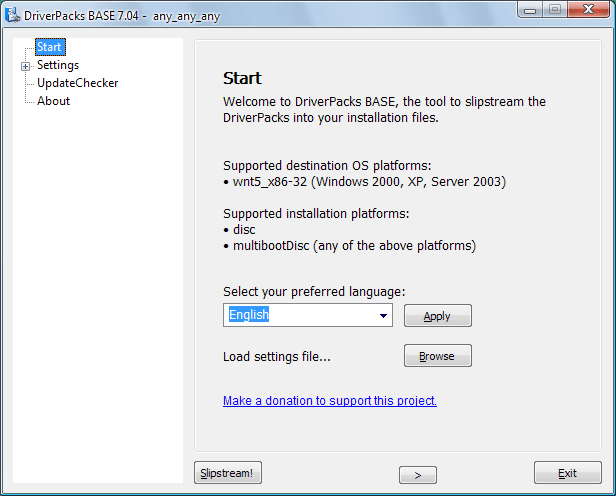
			<content type="html"><![CDATA[<p>Overflow is correct.&nbsp; You must select the folder &quot;that contains&quot; the i386 folder.<br />Then below your folder path DriverPacks BASE will display the version of Windows that you have selected.<br />If you don&#039;t see that, then you didn&#039;t pick a valid source directory.</p><p>For your question regarding settings:<br /><span class="postimg"><img src="http://driverpacks.net/sites/driverpacks.net/files/docs_images/DPBase4.png" alt="http://driverpacks.net/sites/driverpacks.net/files/docs_images/DPBase4.png" /></span><br />The DriverPacks BASE allows you to load different settings files for different types of builds.&nbsp; This may save you time if you do lots of different tests (like us) so you don&#039;t have to check/uncheck all the different options for each settings page.&nbsp; By default, DriverPacks BASE saves your previous run as DPs_BASE.ini and loads that automatically the next time you run it.&nbsp; This gives you the option to &quot;override&quot; the default settings.<br />Hope that&#039;s more clear.</p>]]></content>
			<author>
				<name><![CDATA[mr_smartepants]]></name>
				<uri>http://forum.driverpacks.net/profile.php?id=1602</uri>
			</author>
			<updated>2011-09-07T05:27:36Z</updated>
			<id>http://forum.driverpacks.net/viewtopic.php?pid=45385#p45385</id>
		</entry>
		<entry>
			<title type="html"><![CDATA[Re: "There are not yet any slipstream modules available for the selected..]]></title>
			<link rel="alternate" href="http://forum.driverpacks.net/viewtopic.php?pid=45382#p45382"/>
			<content type="html"><![CDATA[<p>if you select a valid location then the&nbsp; &quot;location&quot; box will no longer say &quot;select a valid location&quot; and the OS: N/A will change to read the OS that is contained in the I386 folder.</p><p>If the OS is not listed after &quot;OS:&quot; like this:</p><p><span class="postimg"><img src="http://216.68.161.2/clipboard.jpg" alt="http://216.68.161.2/clipboard.jpg" /></span></p><p>then you have not selected a valid OS location. </p><p>If you do not select a valid location then you can not make any selections (the rest of the GUI screens are hidden)</p><p>and you will get the &quot;There are not yet any slipstream modules available for the selected platform&quot;. error when you hit slipstream.</p><p>BECAUSE there is not valid slipstream possable if you don&#039;t select an OS. ( a valid OS )</p><br /><p>You said you chose the I386 folder... that is an error. (user error)</p><p>The directions clearly say to select the FOLDER THAT <strong> CONTAINS </strong> THE I386 FOLDER... Try doing it the way it says to <img src="http://forum.driverpacks.net/img/smilies/wink.png" width="15" height="15" alt="wink" /> <img src="http://forum.driverpacks.net/img/smilies/tongue.png" width="15" height="15" alt="tongue" />.</p><p>So yes you read the instructions and you searched the forum... but you did not read <em>carefully</em> </p><p>Hope that gets you going!</p><p>PS. Just to be crystal clear, in the above picture the path to I386 is &quot;M:\XPtest\I386\&quot; and &quot;M:\XPtest\&quot; is the folder that contains I386 <img src="http://forum.driverpacks.net/img/smilies/big_smile.png" width="15" height="15" alt="big_smile" /></p>]]></content>
			<author>
				<name><![CDATA[OverFlow]]></name>
				<uri>http://forum.driverpacks.net/profile.php?id=1097</uri>
			</author>
			<updated>2011-09-07T03:12:17Z</updated>
			<id>http://forum.driverpacks.net/viewtopic.php?pid=45382#p45382</id>
		</entry>
		<entry>
			<title type="html"><![CDATA["There are not yet any slipstream modules available for the selected..]]></title>
			<link rel="alternate" href="http://forum.driverpacks.net/viewtopic.php?pid=45381#p45381"/>
			<content type="html"><![CDATA[<p>Hi. First of all, I&#039;ve already searched in the forum, but it didn&#039;t help me.</p><p>I&#039;m trying to create a Windows XP SP3 DVD with sata drivers, so that I will not need(maybe) to insert diskette while installing Windows in a sata HDD.<br />OK, the point is I&#039;m stuck in this page:<br /><a href="http://driverpacks.net/docs/beginners-guide-windows-xp/step-4-using-driverpacks-base">http://driverpacks.net/docs/beginners-g … packs-base</a></p><p>It says:<br />&quot;On the screenshot below, you can select your language, load any previously-saved settings (.ini) file, go straight to slipstream (if your settings are already set)&quot; [...]</p><p>What settings??</p><p>&quot;Disc&quot; is already selected. Then I click on the browse button and select the I386 folder. Nothing happens.</p><br /><p>Even so, following the guide, I click on the right arrow button. The next screen is &quot;about the driversPack base&quot;. As there is no option, I click on &quot;slipstream&quot; and get the error: &quot;There are not yet any slipstream modules available for the selected platform&quot;.</p><p>I&#039;m not getting anything.</p>]]></content>
			<author>
				<name><![CDATA[washington11]]></name>
				<uri>http://forum.driverpacks.net/profile.php?id=19611</uri>
			</author>
			<updated>2011-09-07T00:35:00Z</updated>
			<id>http://forum.driverpacks.net/viewtopic.php?pid=45381#p45381</id>
		</entry>
</feed>